TeleRank Assets — All Your Bots, Groups & Channels in One Place
The Assets page — reached via More → Assets — gives you a single, cross-account view of every bot, group, and channel owned by all your accounts.
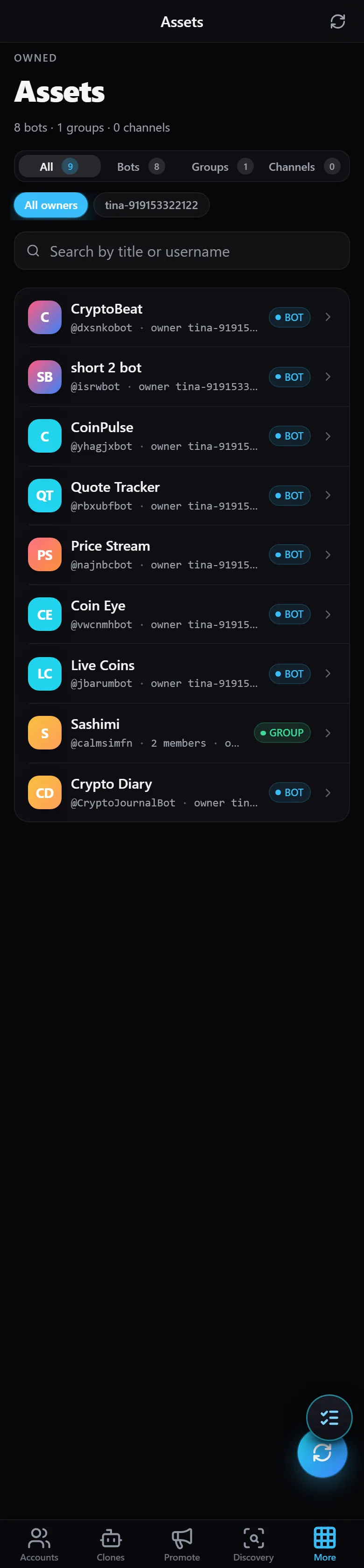
At the top you’ll see a summary count: how many bots, groups, and channels you have in total (for example, “8 bots · 1 groups · 0 channels”).
- Filter by type —
All/Bots/Groups/Channels, each showing its count. - Filter by owner —
All ownersor a specific account, to narrow the list to assets belonging to one account. - Search — by name or username.
Each asset is shown as a card displaying its name, username (@handle), the account that owns it, and a type badge (BOT / GROUP / CHANNEL). Groups also show their member count. Tap any asset to open its detail view.
If an asset is missing from the list, run Sync owned assets from the account management page to re-scan conversations and BotFather.