
Promote in TeleRank — Targets, Leaderboard & Campaigns
The Promote page is the control center of TeleRank’s promotion engine. Here you see which keywords are worth targeting, how much it will cost to reach the top, and you manage all running campaigns.
The Promote Screen
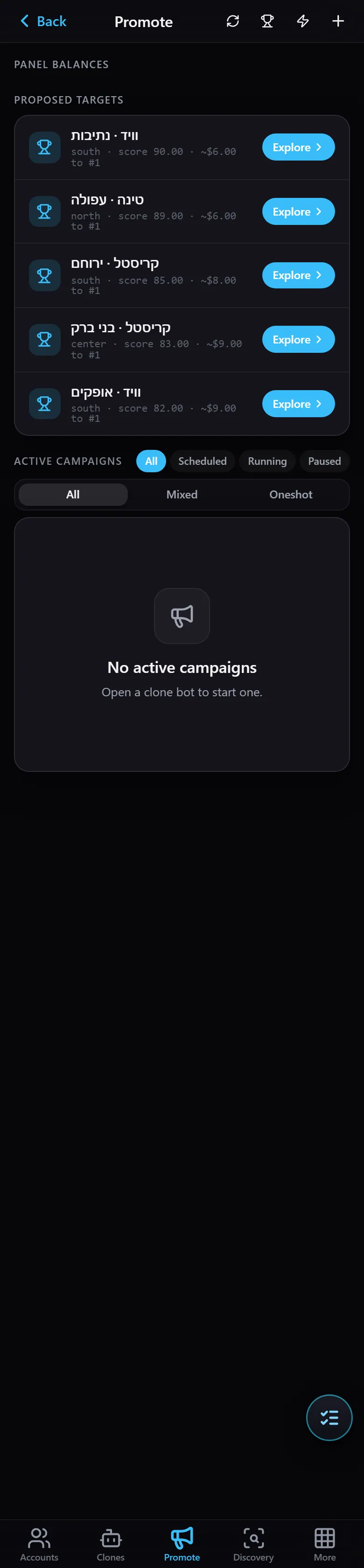
- Panel Balances — the available credit on each SMM panel you have connected (promotions are purchased from these balances).
- Proposed targets — keywords the system recommends targeting, each showing a score, an estimated cost to reach #1, and an Explore button.
- Active Campaigns — all currently running campaigns, filterable by status (
All/Scheduled/Running/Paused) and type (Mixed/Oneshot). When no campaign is running you will see “No active campaigns — Open a clone bot to start one” (campaigns are launched from a clone bot).
The Leaderboard
Clicking Explore opens the Leaderboard — every relevant keyword ranked by how worthwhile it is to pursue:
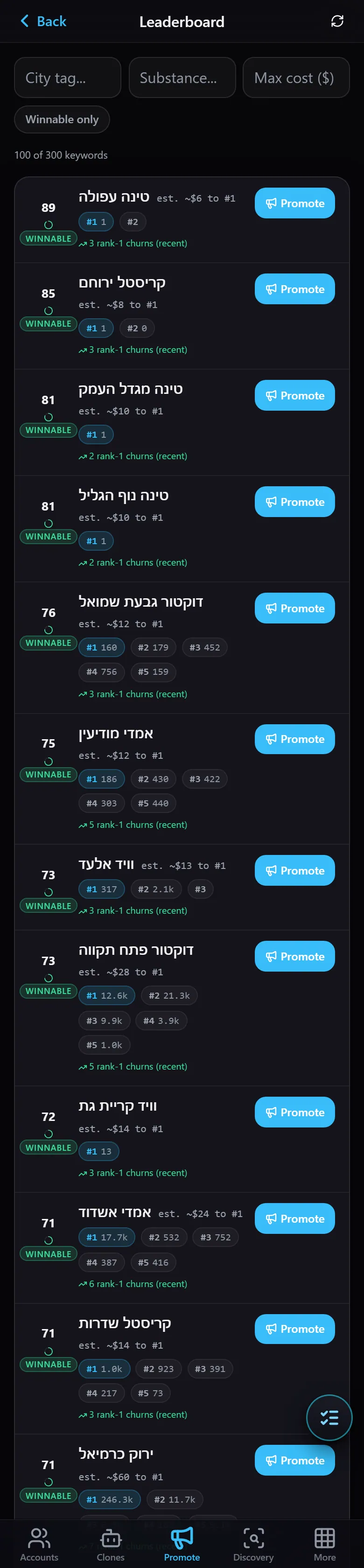
Each keyword shows:
- WINNABLE tag — whether you can realistically capture this keyword.
- Score and your current position (e.g. #1).
- est. … to #1 — the estimated cost to reach the top spot.
- churn — how volatile the top positions are (how frequently the leaderboard shuffles).
- Filters — by City tag, Substance (category), Max cost, and Winnable only (show only keywords you can capture).
- A Promote button to start a promotion campaign for that keyword.
Use the leaderboard to find the most profitable target — a winnable keyword at a reasonable cost — and kick off your campaign.