Discovery — The TeleRank Scanner
The Discovery tab opens the Scanner — the engine that tracks keywords across Telegram, reveals who ranks for each one, and feeds every ranking and promotion feature in TeleRank.
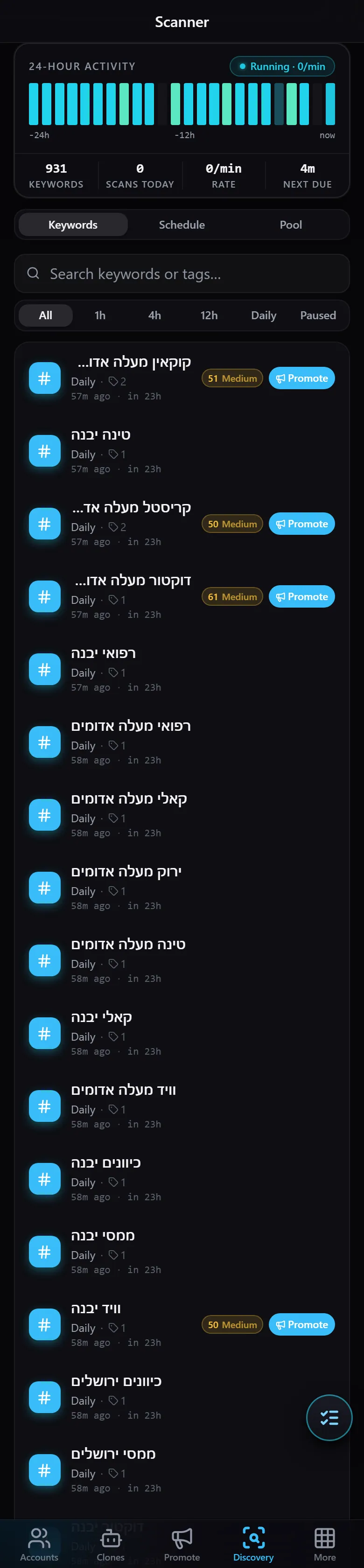
At the top of the page:
- 24-HOUR ACTIVITY — a chart of scan activity over the last 24 hours, with a
Running/Idlestatus indicator. - Statistics — the number of keywords currently tracked (KEYWORDS), scans completed today (SCANS TODAY), the current rate (RATE), and time until the next scheduled scan (NEXT DUE).
Below that, three tabs:
- Keywords — the full list of tracked keywords. Each entry shows its scan frequency, a strength badge, and a Promote button that takes you directly to the promotion flow. Filter by frequency (
All/1h/4h/12h/Daily/Paused) or search by name or tag. - Schedule — configure how often each keyword is scanned.
- Pool — the pool of available keywords you can add to your tracking list.
The Scanner is the foundation of everything else: the data it collects drives the Competitors page and the Promotion leaderboard.